Windows firewall rules
Monema App
Sometimes the Monema application may be blocked by the Windows firewall. This usually happens when installing it for the first time, when you click "No" to the permissions in the pop-up window.
To remove the restrictive rule from the Windows firewall, follow these steps:
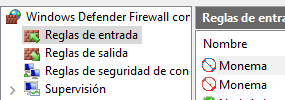
- Home > Search for "Windows Defender Firewall" > Advanced settings.
- Entry rules / Exit rules. In both cases, make sure that the Monema application does not appear with the 🚫 symbol.
- If it is, right-click to delete.
- Repeat the process for all Monema rules you find.