
Transfer calls
Monema App and other SIP protocols
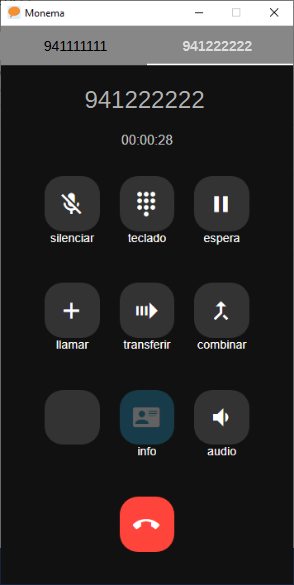
- With the call in progress, tap the 'call' button [+] and dial or search for the contact you want to call, then tap the green button or the contact's name.
- This will open another tab with the new call in progress and put the original call on hold.
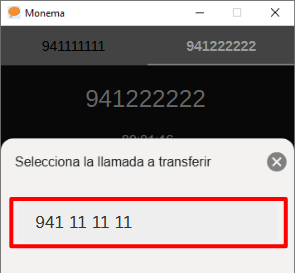
- Finally, click on the 'transfer' button [🢚] and select the number to which you want to transfer the call. When you do this, the call will be disconnected for you, but it will remain active for the other two speakers, who will now be connected to the same call.

Another way to transfer SIP calls
- During the call, you can press # followed by the extension number or external phone number you want to call. This puts the person you are talking to on hold.
- If at any time you want to return to the original call, press *.
- Once you have established contact with the other person, you can hang up the call to complete the transfer.
Yealink Terminals
- Press the "Tran" button, which puts the person you are talking to on hold.
- Dial the extension of the colleague you want to call.
- Talk to them. If they accept, press the "Tran" button again to transfer the call.
- If they do not accept, end the call with your colleague by hanging up or pressing the end call button. The terminal will show you the held call, giving you the option to resume it.